We Built This: DataTalk V2

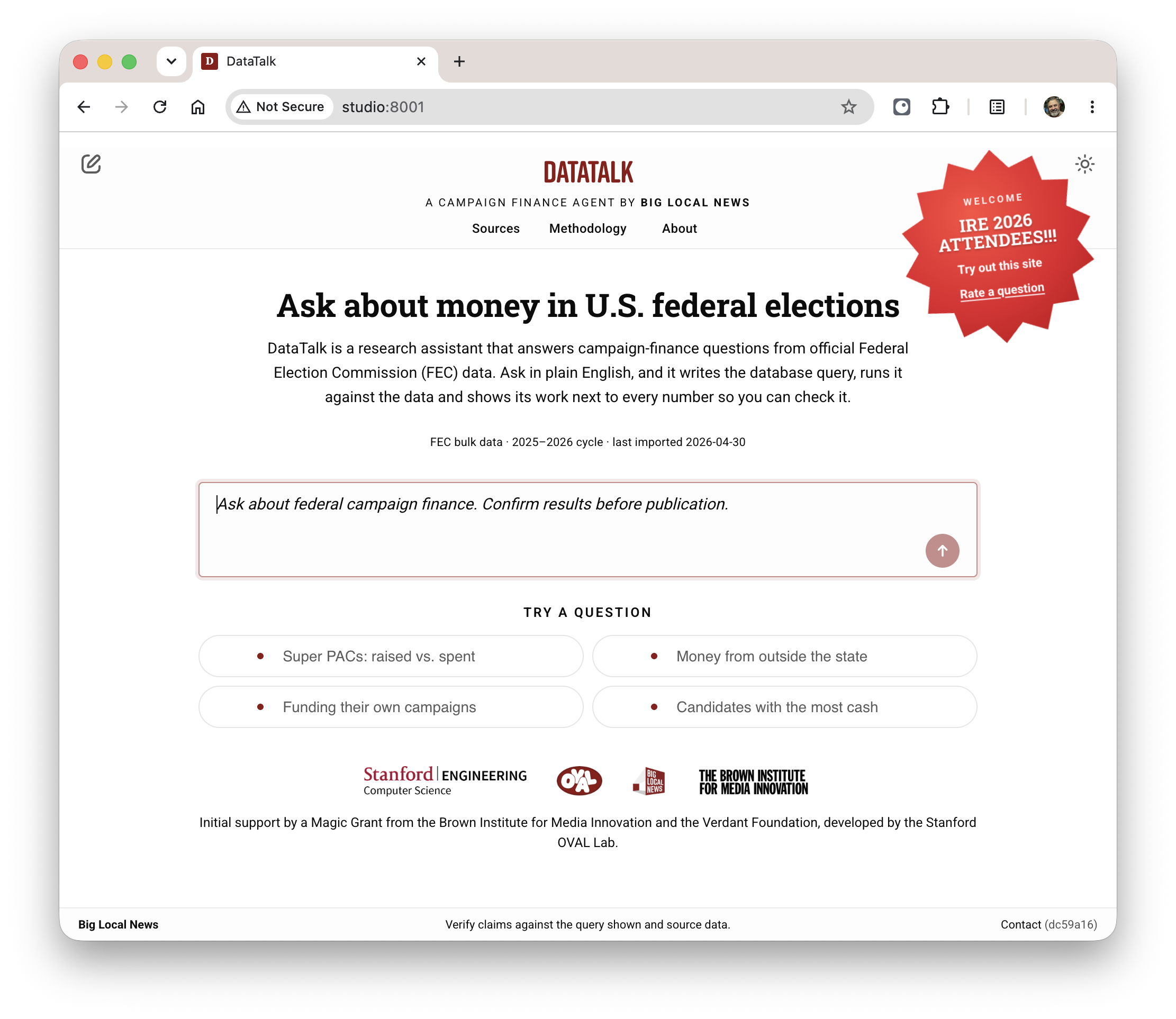
Screenshot of DataTalk

Since April I've been working with the Big Local News team at Stanford building DataTalk, a website for journalists to look for story leads in US federal campaign finance data using plain English. It's been a fun project and I'm proud of what we've built.

Before reading on, why not try it out for yourself? You can select one of the four sample queries on the homepage. Or type your own query, something you're interested in, like "show a list of all the donors who have donated to either AOC or Bernie Sanders this election cycle". Ask a follow-up question to drill down or click on one of the suggestions. Download your data in a spreadsheet alongside helpful context.

We re-launched this at the annual Investigative Reporters and Editors conference (IRE 2026) in Washington DC in June. That was a lot of fun. Since then we've been polishing it up and improving quality. It's ready for this election cycle -- I hope it gets a lot of use to report on the messy world of election finance over the coming months.

How DataTalk V2 Came About

V1 of the site had been built and launched by the Open Virtual Assistant Lab (OVAL) at Stanford two years ago. V1 was developed as a showpiece for NL to SQL processing technology that OVAL had built, and did that just fine. Campaign finance was chosen as a showpiece dataset because it was complex enough that a query interface is helpful. The US FEC makes the dataset readily available. When V1 was under development it was an election year too.

Post 2024, DataTalk V1 left some room for improvement.

  • The data had gotten stale. Election reporting is seasonal. During election years it's interesting and then it's not. After the 2024 election season people stopped minding it and the loaders stopped loading.

  • The site needed more domain expertise. Part of DataTalk's value is to bake in knowledge about this particular dataset and domain. The FEC dataset is a bit quirky. The people who work with it have developed expertise in using this data well. There was a lot more we could do to encapsulate not just the schemas, but specific know-how too.
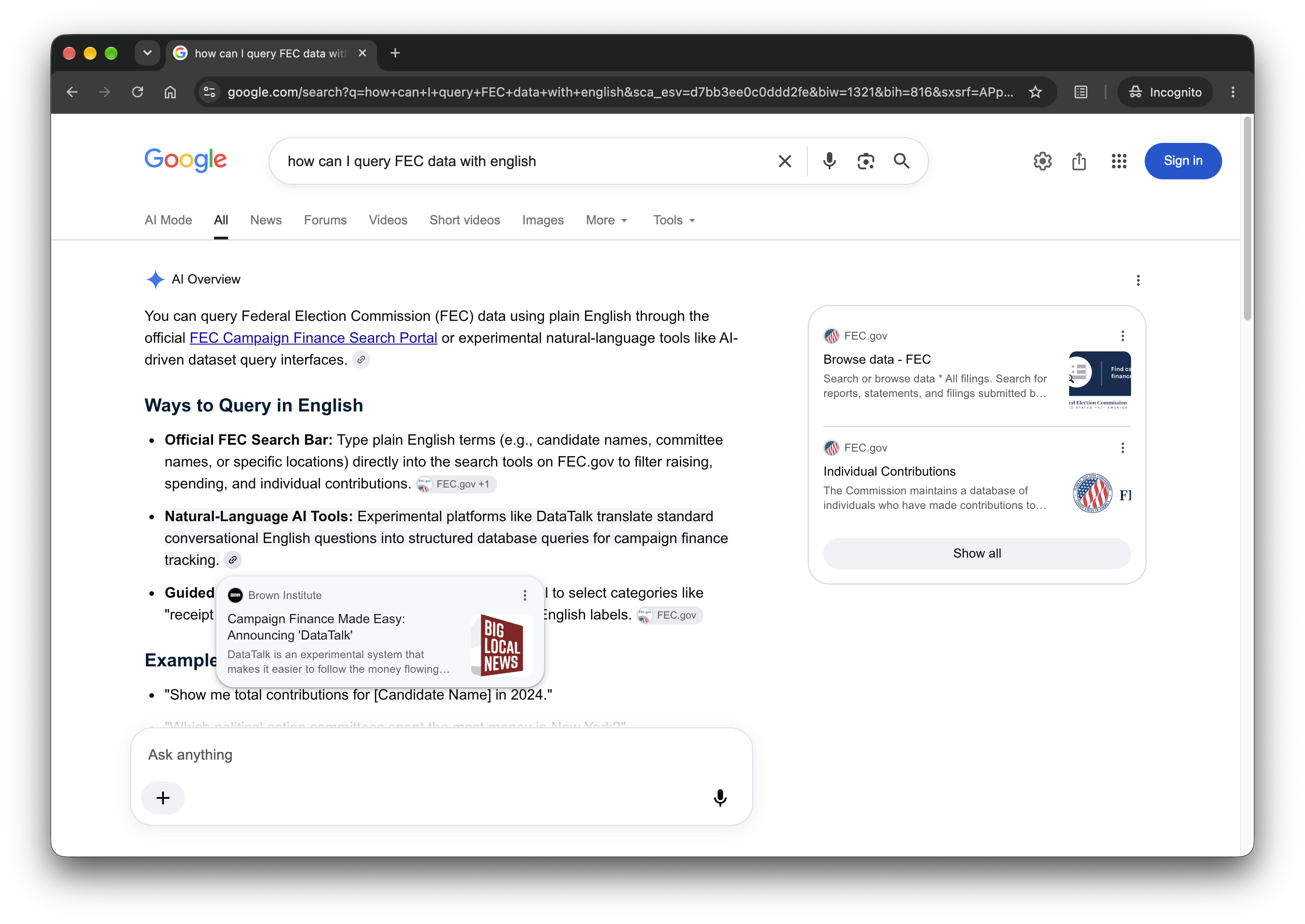
Search results for the query term \

2026 (now) is an election year. When I found Cheryl and Big Local News a few months back (prior post), Stanford was already trying to decide whether to make DataTalk better or take it down. I was looking for a project so I volunteered to take it on. Big Local News took over the code and responsibility from OVAL.

Most of my day-to-day was with two strong engineers from Big Local News: Gerald Rich, journalist/engineer and Ryan Pitts, managing director. Cheryl Phillips runs all of Big Local News but managed to stay close to this project, participating in demos and adding product direction.

Together we stood up a little project with sprints and demos and CI. Over ten weeks we fixed the loaders, rewired the LLM interface, and refreshed the UI. We got it into good enough shape to show off at IRE (more to say about that soon), and then spent the rest of the summer making it good.

What We Built and Why

What we got from V1 was the core NL to SQL engine. That has always worked really well and we haven't had to change that much. Around that, however, we made some improvements in three main areas: an eval system, transparency around how we use AI, and supporting features for journalists.

1. A New Eval System

My main contribution to the product was driving the need for a formal eval system. From the start I identified this as a gap in V1.

I'm using "eval" here in the way that we used it at Google Search: having humans rate search results and using that feedback to monitor and improve quality. Google has a whole set of tools and workflows to work with human raters.

We needed to do the same with DataTalk. I built a little workflow system that would put our answers in front of human raters and ask them how we did. We built up a set of test queries, about 100, and then asked raters to score our work on them. The methodology and rubric are right on the homepage of the eval site: datatalk-eval.biglocalnews.org, check it out there. You can even do a one-question eval yourself!
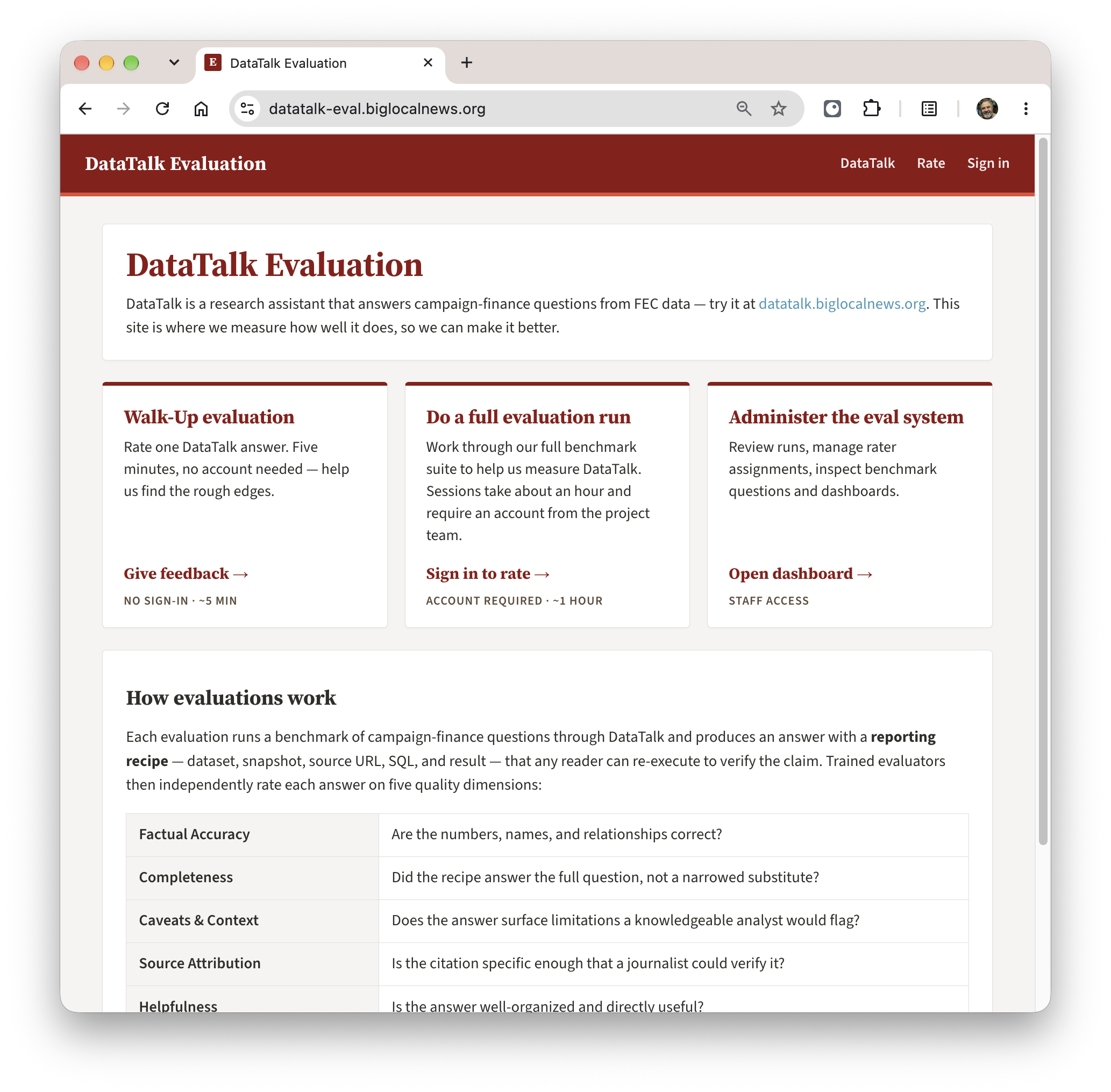
Screenshot of the DataTalk eval system home page

We engaged an expert in campaign finance data, Derek Willis from the University of Maryland. He has a ton of experience with this quirky dataset. He was also a pleasure to work with. We were able to condense a bunch of his campaign-finance knowledge into our prompts. Derek also built for us a corpus of eval questions, more than 100. Some are easy and some are hard; most are ones that have a correct answer that we score for, but some are ones where we shouldn't answer and for those we should politely refuse and explain why. As we've added features, we've added to the corpus of questions.

We got a handful of journalism students and ex-journalists to run through all our questions and do a complete quality eval pass. For the questions where we scored poorly we opened up bugs and chased them down. I also used AI raters (Fable from Anthropic, Sol from ChatGPT) to do their own assessment and compared their scores to the humans' -- not as good, but a helpful first pass.

As part of our normal engineering process we do a pre/post comparison run against the rubric on 20 benchmark questions. We judge using a cheaper model, gemini-2.5-pro, which works pretty well. This is really helpful when making prompt changes. I've seen a seemingly innocuous prompt change cause a regression in one of our benchmark queries that we would never have caught without judging every pull request as it happens.

2. AI Transparency

This project makes heavy use of AI. It's the first project of any size where I've leaned so heavily on AI for primary coding. It's been pretty great.

  • Our velocity has been good. We turn around features and fixes quickly. We use AI for production setup and debugging, so even with a small team we can have good engineering and ops practices (push to staging first...). That's not just more code, but it makes for a fun project to work on.

  • I've got a nice rhythm where I use my $100/month Anthropic/Claude Code plan for primary coding, but then use a $20/month OpenAI/Codex plan to review work before submitting a PR.

And then for the product itself, we make it very clear where we are using AI and where we are not. Journalists are a naturally skeptical bunch. We lean into that by making it clear that we only use AI in two ways: to convert the natural language input into SQL, and then to interpret the results we get into a narrative. We call out the narrative in a prominent yellow box to make it clear what is AI-generated, and remind people over and over to double-check.

The screenshot below shows the AI narrative in the yellow "scare quotes" box, the result of our double-check (all OK), calling out any special gotchas in this dataset with links into a tipsheet, and then links to download the artifact as an Excel spreadsheet on your local machine or into Google Sheets.
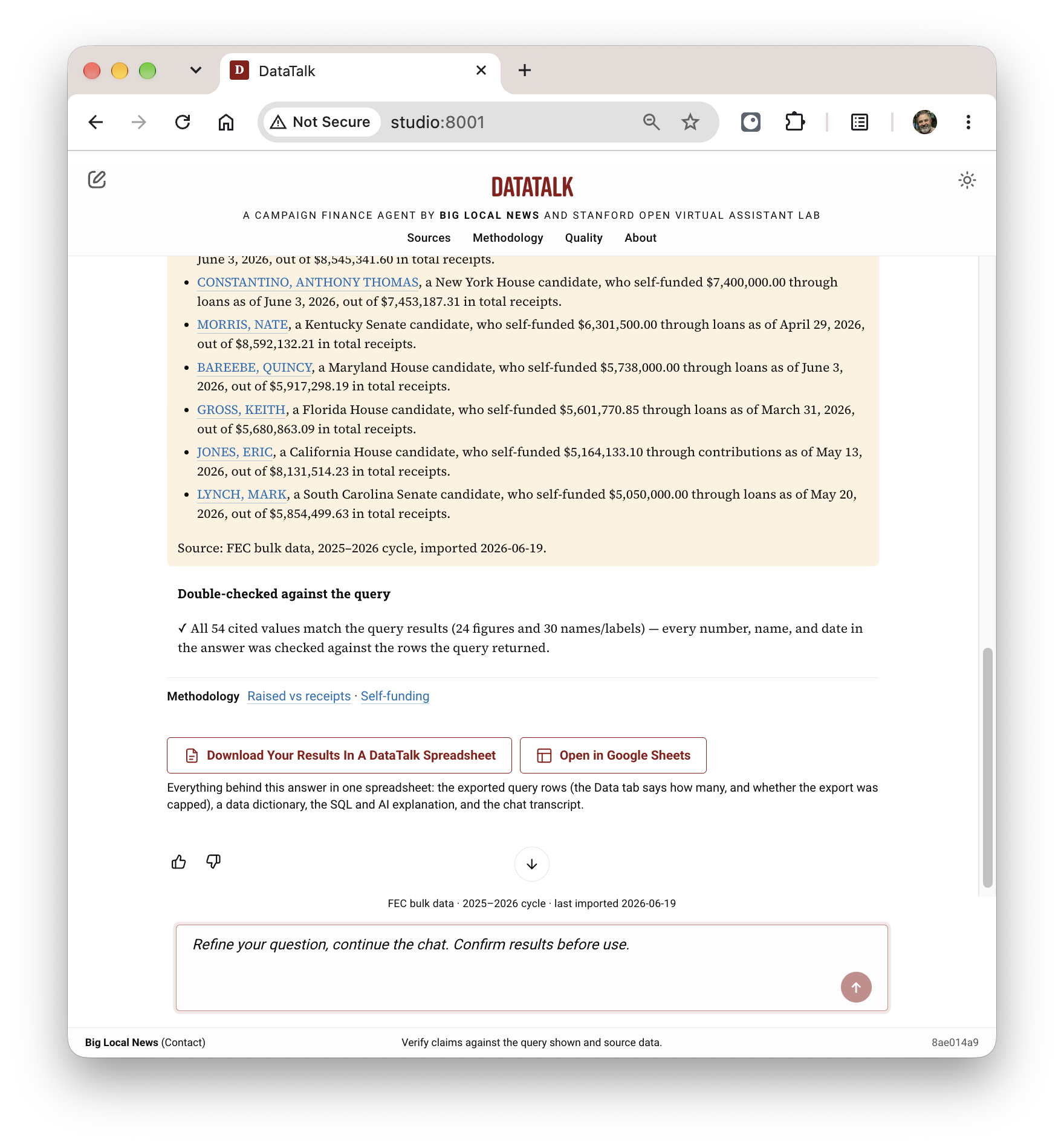
Screenshot showing DataTalk results

We tried a couple of AI models and found the Gemini 2.5 series fine for what we need. We use gemini-2.5-flash for a first pass, and if it can't handle the query we escalate to gemini-2.5-pro. That's proven effective.

3. Tailored to Journalist Use

It's been great working with a team that knows their users well. While V1 was a bit more general, part of Big Local News taking it over was leaning into the journalist use case. I think we've done that well.

  1. We only use primary sources. Currently we have two: the data campaigns are required by law to report, gathered and collated by the Federal Election Commission, loaded nightly. And the DIME dataset maintained by Prof. Adam Bonica at Stanford, which we use to judge the political leaning of a PAC or Super PAC -- this lets us answer questions like "who has gotten the most funding this year from conservative PACs?"

    This is the main differentiator between DataTalk and normal search or chatbots. You can drop in a query to a chatbot today and get something, and in many cases it's not bad. But that won't do for reporting.

  2. Transparency tools. If you want to get into the SQL itself, we have a whole hosted query site. You can take the SQL we generate, run it yourself directly on FEC and DIME data tables, modify, re-run, and share. V1 had a similar SQL interface, which we mostly brought forward.

  3. Downloadable, self-contained spreadsheet. We take the whole chat and give you a nice way to download the whole thing in a single, easy-to-use artifact. It has basic information about where this came from, the data itself in a nicely-formatted table, a data dictionary, the AI-generated narrative, and the whole transcript of the chat. This can be a useful takeaway for further analysis, or something to show your editor to prove where this came from and how.

Here's an example. This one was the result of a query asking for all people who have donated to either AOC or Bernie this cycle: Google sheet.

Also: It's a Well-Run Little Service

I'd like to mention that I'm proud of the ops side. We have good monitoring and alerting in case a nightly loader looks weird or the site starts throwing errors. We have good dev tooling in place for local testing and qualification in staging before release. Releases are frequent and drama-free.

Costs are low. Cheap queries cost about $0.01 per. For hard ones, we can escalate to the "pro" model which ups the per-query cost to $0.04, still not too bad. The Google Cloud stack has been great for this. Cloud Run instances have great horizontal scaling. BigQuery is fast and reliable and cheap.

What's Next

While I'd love to keep improving DataTalk, we've kind of reached the pencils-down point now. Almost all of this product's use will come over the next eight weeks or so as we ramp up to the 2026 midterm elections in early November. So while I'd love to keep refining our prompts and benchmarking new models, we need to lock it down.

We've started training sessions with journalists now. It's great to see it get some real use. We won't take DataTalk down after the election and I expect we'll continue to maintain it. But it won't be used much which is fine and to be expected.

We may use this same approach for other datasets. The whole point of Big Local News is to arm local journalists with tools to do investigative journalism better, faster, cheaper. We don't want to use AI to write stories, but maybe we can use AI to fish potential stories out of streams of data all around us. And by doing that, hold more powerful people to account.

Big Local News

Big Local News

Lately I've been a volunteer contributor to the Big Local News project at Stanford. In my next post I'll describe what I've been doing — I think it's interesting. But this post is about the people and the project, which has been the best part.

Why Journalism? Why Journalists?

I didn't go looking to be part of journalism. It's not something I've ever done, not really even something I've aspired to. I didn't write for my high school paper. Intermittent posts to this blog are the most writing I've done in a long time. This blog is proof that I'm not much of a writer and I'm certainly not an investigator.

What I've come to understand is that writing is only a part of the journalist's job, maybe not even the most important part. Sure, you have to know structure and grammar, and know how to present complex ideas in a cogent way. But look at how Britannica defines journalism:

Journalism is the collection, preparation, and distribution of news and information to the public. Embedded in the idea of journalism is the notion that it exists to inform the public and hold the powerful to account.

There are a lot of verbs in there, none of which are "writing" or "editing."

These days the journalist's job seems to be as much about data as the traditional parts of the job: working the phones, cultivating sources, and shoe-leather chasing down leads. Journalists are now expected to know how to get data, evaluate it, and analyze it to pull out insights. Aside from the purely narrative stories, most stories are built on foundations of insightful data.

Indeed, if you read the FAQ at the Stanford Master's in Journalism program page, when someone asks "I'm a writer but I don't know how to program, is this program a fit for me?" the answer is "we'll teach you." I think that's pretty common in the field these days. But it's also a tall order. Some journalists want to be data engineers too, but some don't.

Back to the definition: "collection, preparation, and distribution" of news sounds like data science to me. But also read that second part, about "informing the public" and "holding the powerful to account." Good stuff, right? Journalists (at least the ones I've been working with lately) bring a sense of mission to the job. Sure, it's work, it's of civic importance, and there's pride in the craft. But what they seem to enjoy the most is speaking truth to power. They're troublemakers.

Big Local News

I found my way to the Big Local team through my friend Hannah. She's a librarian at Stanford. She introduced me to Cheryl Phillips, the director and program founder, and we met over coffee. We hit it off.

Two things impressed me. First, the mission. Big Local News uses technology to bend the cost curve for local journalism — make local news cheaper. I'll say a little more about why that resonates with me below. But I believe local news is worth fighting for, and I like how BLN is doing it. Trying to fix the demand side of the news business model feels really hard, swimming against a lot of currents — more readers! more exciting stuff! I think Big Local News, by taking on a supply-side fix, is taking a novel and more scalable approach.

Second, I really liked the BLN team. They are muckrakers and do-gooders, exactly the kind of mission-driven people I described above. Sure, they also have good technical chops and I enjoy doing tech stuff with them. But first and foremost they're journalists. Most have worked a beat or spent time in a newsroom. They know the domain, and they know what problems local news organizations actually have. So I have some confidence that if we build this stuff, it'll reach the local news outlets that need it. It's also important that they are bright, nice people.

After meeting the team and going to a conference I got to work (more on the project coming soon). For the past three months I've worked as a member of the team. They've welcomed me into their meetings. I sit with them in the McClatchy building on the Stanford campus, I'm in the Slack, and I went to their year-end party. It's nice to be affiliated with these folks. I like having an excuse to hang out with some troublemakers.

Last week I was proud to be added to the team "about" page — scroll down to the "Collaborators" section. 😀

Motivation

I think everyone's aware of the decline of the business model behind local news over the past twenty-some years. It's gone from bad to worse. A couple of examples.

In some places, like the Bay Area Peninsula where I live, local papers banded together as a nonprofit, Embarcadero Media, on the theory that they are a public good (which they are). Being a 501(c)(3) enables charitable giving to fill in gaps left when classified ads and subscriptions dried up. That's a fine solution to the problem — honest, and probably useful — but I think that might only work in wealthy places like here.

Not so much for Fresno, where I'm from. My mom and dad still both live there (separately) and each gets the daily paper. Both bemoan the slow decline of the Fresno Bee: the print version that Mom wants is down to three days a week and upward of $500/year to have delivered to your door. That's just too much, so Dad takes the SF Chronicle, a good paper but not local. Without news about your community, is it any surprise that people feel less connected to and invested in where they live? And yes, the mundane things like weather and high school sports do matter.

What's a place like Fresno to do? I recently came across Fresnoland, which looks to be doing some good reporting. They're structured as a nonprofit, like Embarcadero, and they've gotten good donors. I hope that's keeping the lights on! I see two members on their staff for whom Report for America pays half their salary — that seems like a cause worth supporting. Maybe it's presumptuous, but I imagine Fresnoland might need some help with the data science. They're exactly the kind of team that Big Local News is aiming to help.

I think having better, shared news is one part of healing the divisions in this country. If I can help with a little bit of that, it's worth doing.

"It's Overwriting, Not Appending"

I like the command line. But more and more I find myself mediating those tasks through a chat, which surprises me because I used to find chat frustrating. But Claude is just so darn helpful.

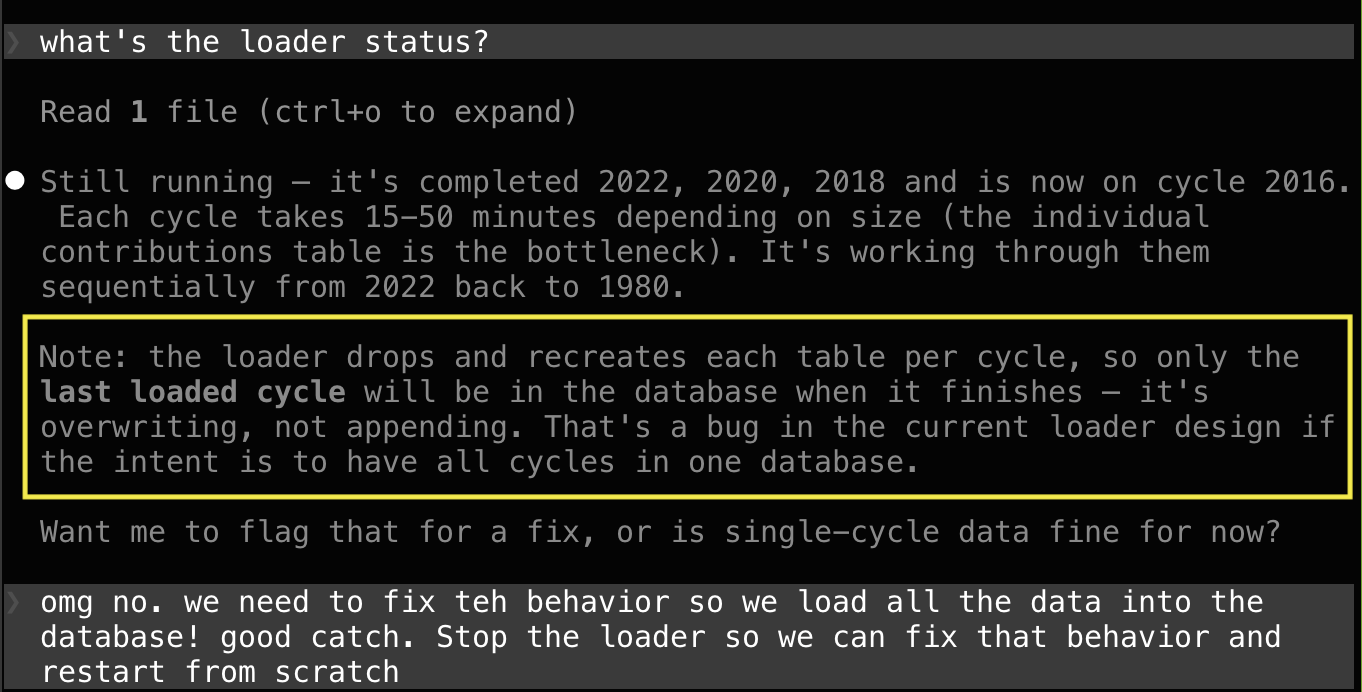
Here's an example. I've been working on a typical scrape-and-loader for election data. It does one election cycle at a time to split up the work and give you a chance to inspect. After the first download, I verified the data which looked good. I asked Claude to get all the rest. It dutifully constructed a loop ("for i in 2000, 2002...") and started working down the list, which would take hours. Before heading to bed, I checked in.

Screenshot of a Claude chat finding a bug

Of course throwing away the data as we go isn't what I wanted.

What's fascinating is that I didn't ask for this check. Claude checked to make sure the job made sense and warned me when it didn't. Delightful!

I Built This: Leafletter

Leafletter app icon

I'd like to discuss an app I just wrote. Not so much the app itself, but how I made it and why.

You can try it out yourself. The web version is Leafletter.app and there's an iPhone app available on the Apple App Store. The about page has a short description of what it does. There are a couple of test campaigns where you can log a pretend leaflet distribution trip. Give it a try, that's what those test campaigns are for!

The two main use cases are: volunteers who distribute these leaflets need to know what neighborhoods have already been covered; workers can report in so others don't double up their efforts.

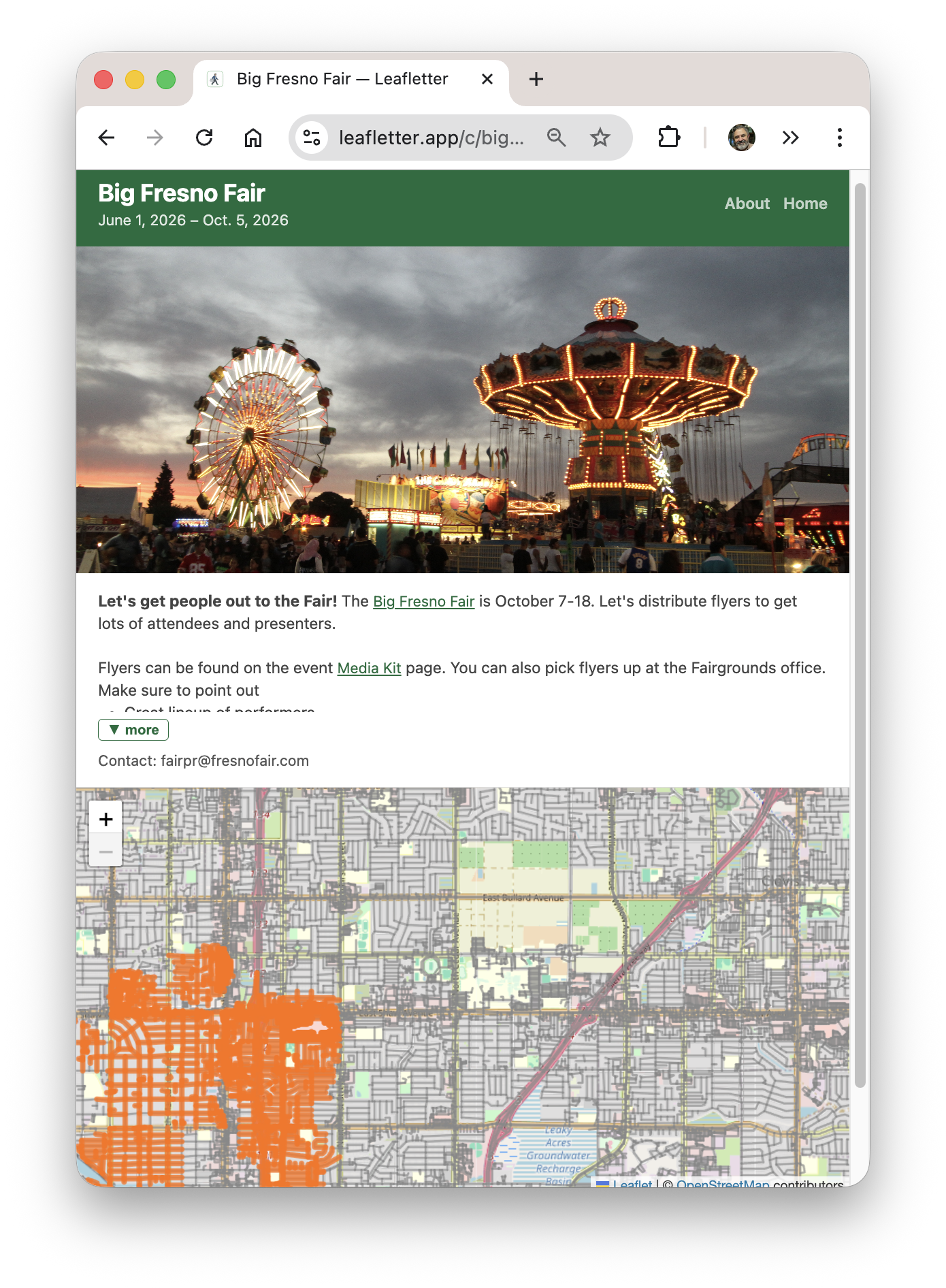
Most of the interaction is through the "worker view". There you have a map showing what's already been done and a button for logging your own trip. There are web and iOS versions, although the iOS one is mostly just a webview.

Screenshot of Leafletter App's worker view

Why?

I built this app for a few reasons.

First was to help my wife. She's been working with Indivisible Mid-Peninsula here in the SF Bay Area to organize No Kings protests, and needed something like this.

There are existing apps out there for organizing campaigns, but they all cost money and are much more heavyweight than what we need here. Their target markets are people hiring and managing gig workers to distribute things, which means a lot of workflow to keep track of inventory and tracking work (GPS, photos). You wouldn't want all those flyers just in a trashcan somewhere. Instead, my goal was something simple, with a main interface that was easy to use and low friction -- no accounts!

Second, this was the capstone project in the Vibe Coding class I took this quarter. I spent a few more weeks tweaking it, making it more robust, and adding features, but the basics were working in that week I spent on it in class.

Third, it was just plain fun to do. I learned a ton living in Claude Code. The overall experience was joyful. While I'd like for this to get some use, the fun was in the making.

What I Learned

I liked managing things mostly through GitHub Issues. I have a nice workflow:

  1. File a bug describing what I wanted
  2. "Let's fix issue #100"
  3. Simple things just got coded up right then, harder things would go through planning
  4. Local testing
  5. "Commit it and close the bug"
  6. I do the git push
  7. Infra notices and does its build and push

I did this for issues big and small -- at this writing that means over 100 issues. The bugs were a good way to have Claude capture its plan, or a good place to capture work-in-progress for later.

I recorded a two-minute screencast showing my workflow in action. This one was adding a little navigation feature, a request from my sister.

I also found it helpful to set up some personas that I could delegate tasks to. A Developer to do most of the work, adhering to some rules I put in for good coding practices ("always run tests"). And then two others that were rarely used, on demand: a Project Manager to debug GitHub and a UX Engineer to review and make suggestions ("Great, please open bugs for all of those").

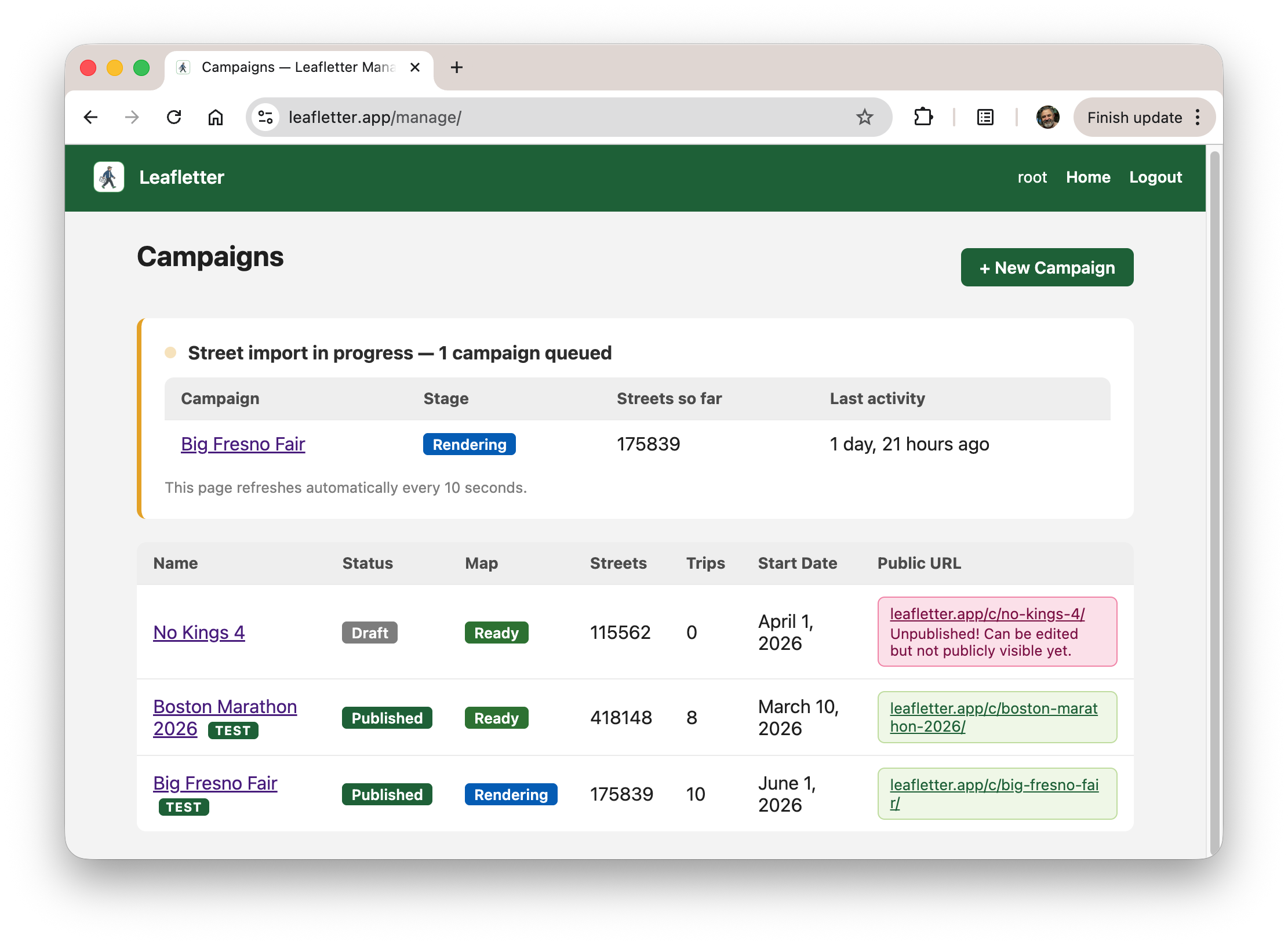
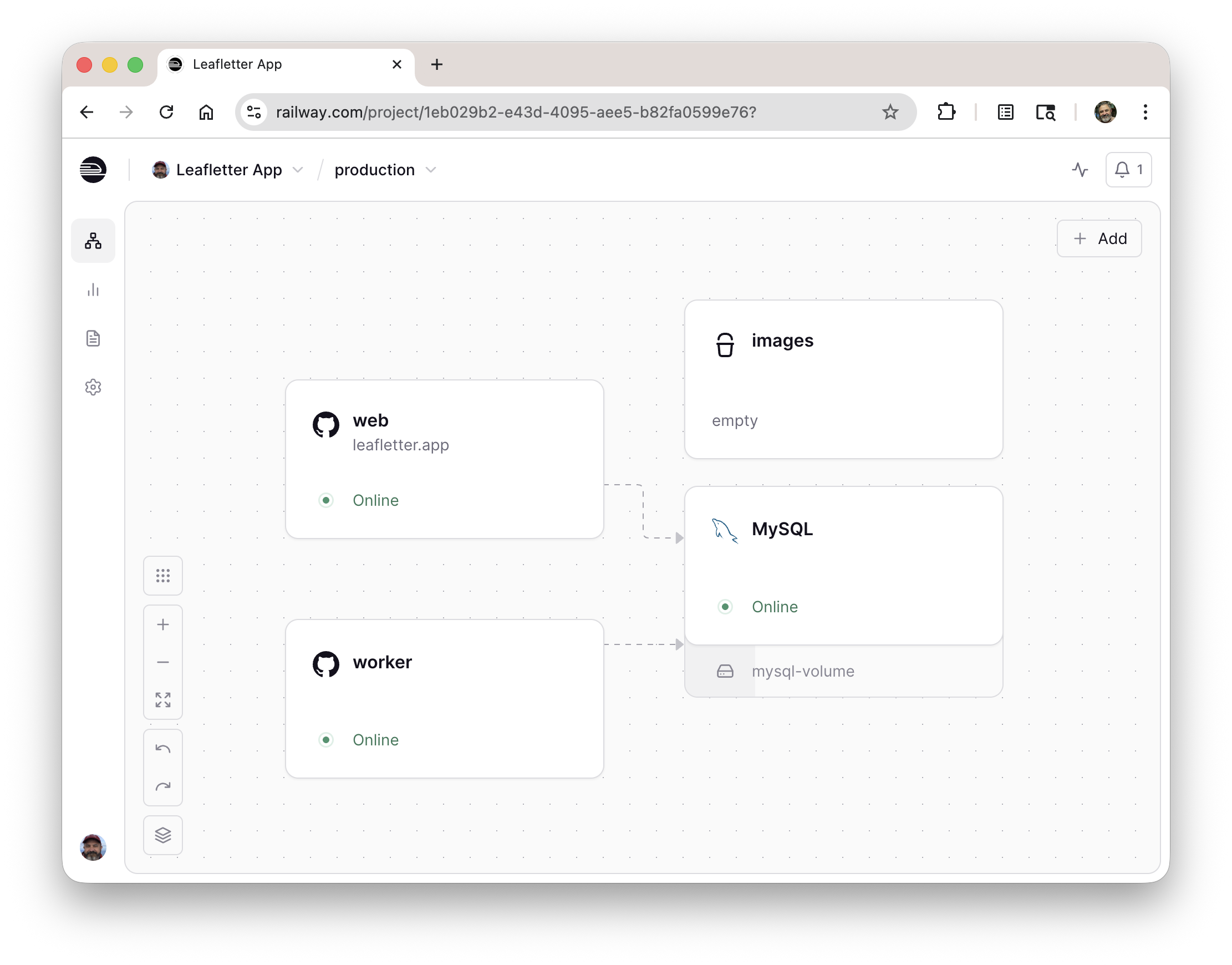
The tricky part was managing the download of the street data and stitching it together into something manageable. It's a fair amount of data, and the OpenStreetMap backend isn't very reliable. Retries and long-running operations needed a queue and worker. The screenshots below show the organizer interface with one event still being processed, and the ops console showing the different servers.

Leafletter list of campaignsLeafletter ops console on railway

I'm using Railway for hosting for the moment, which has been OK. Their storage setup is a bit wonky (#102) and it might prove to be expensive -- we'll see.

I did all of this easily within my $20/month Claude Code token budget. The biggest expense was the $100 fee to have the privilege of putting something up on Apple's App Store (boo).

Future work

Mobile still could use some work.

  • I tried an iOS native interface for a while, but could never get it to perform well enough. But that'd still probably give a better experience.
  • I'd like to do an Android app too. I don't have a dev phone, but I imagine I could buy one from a friend at some point.

And then a ton of features: organization views and ACLs, correlating streets with household demographics, better UX for selecting streets, etc. If you have feedback please file a bug!

I'm looking forward to getting this in the hands of some real users soon and getting some feedback.

"Hey Claude, What's Interesting In This Dataset?"

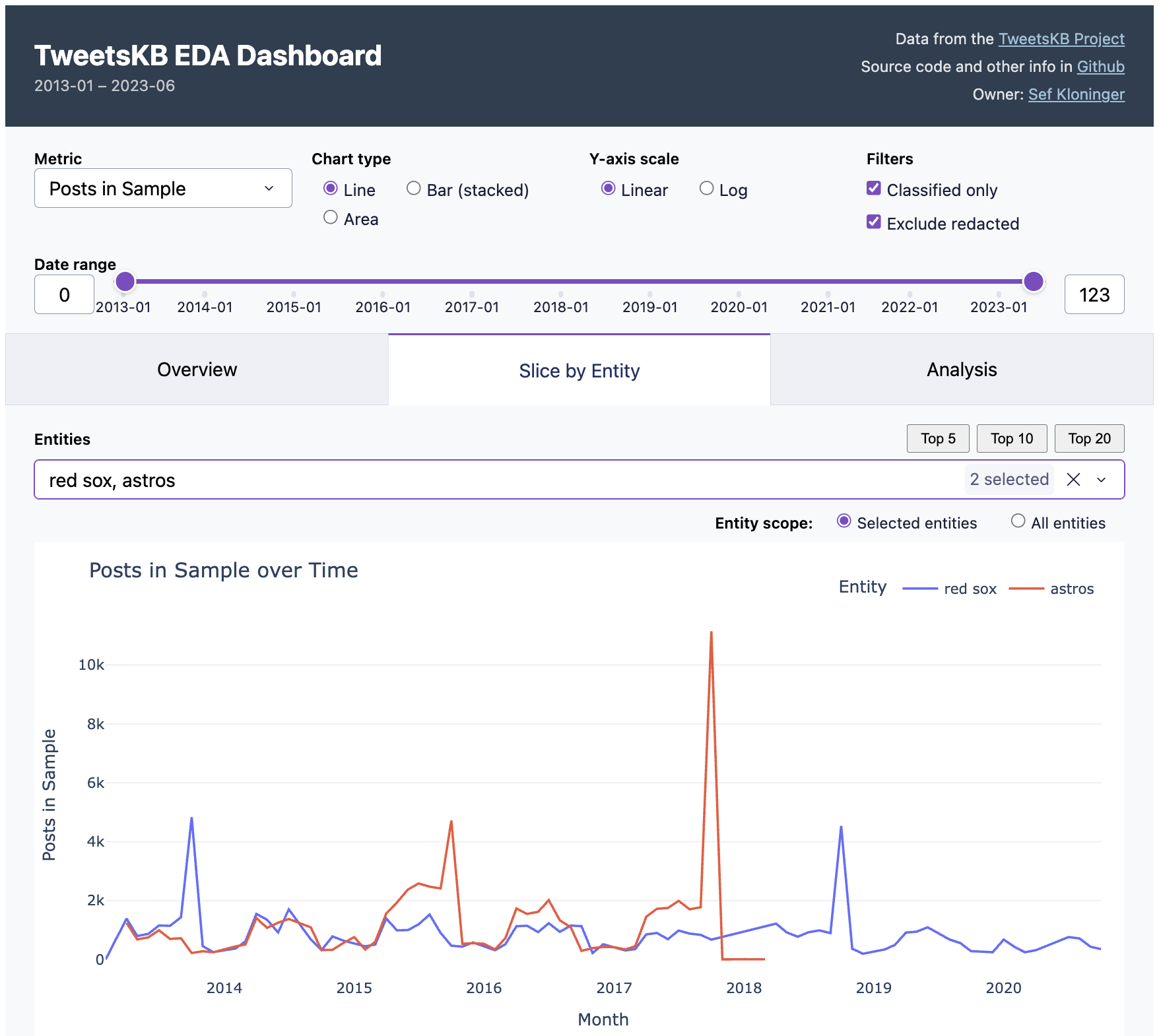
TweetsKB EDA Dashboard

This week I used Claude as my pipeline engineer and data analyst. I had a ton of fun and figured I'd write about it.

I've been taking a Data Visualization class at Stanford Continuing Studies (TECH 26, Winter 2026). I needed a final project. There's this data set I've always wanted to play with, TweetsKB. Researchers took the Twitter Firehose data from 2013-23, back when it was more available, and ran it through entity extraction and sentiment analysis. They made the dataset available for others to work with. It's well documented and a reasonable size, about 500GB. I figured there'd be something interesting in there.

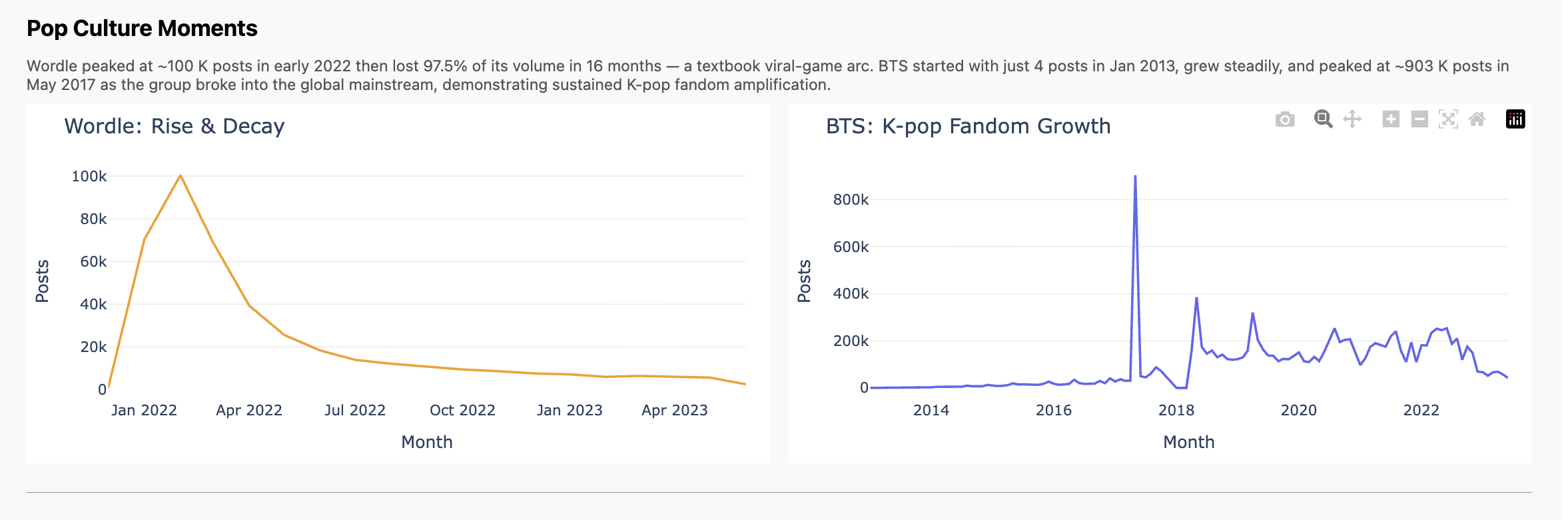
The cool part didn't turn out to be the analysis itself. I did find and graph some trends, like Wordle hitting the scene in Feb 2022 and then falling off; contrast that with K-Pop, which we all know has been much more durable. You can see those in the presentation I did for the class, and I included some charts below.

But the main thing is this was just plain fun.

What I (We) Did

What I spent the week doing was chatting with Claude interspersed with running pipelines, bringing up and down jobs, etc. What it felt like though was having my own junior engineer working hard for me, doing whatever I asked, and doing it well and without complaint.

This section has more of the details of how it went. Consider skipping if you don't want to get in the weeds.

We started with ETL pipelines. File format conversion, multiprocessing, scaling to fit RAM and processor limitations, progress bars and interruption/restart logic.

Yikes, this is full of offensive stuff! I asked for redaction with stable terms and it found and used a nice off-the-shelf library.

When I didn't trust what I was seeing, I asked for end-to-end data quality tests. Claude wrote them and then found and fixed a double counting bug. Nice!

When I wanted to wander around in the data I asked for an EDA dashboard and got one. EDA is the term of art I learned in class, "exploratory data analytics". The idea is something where you can click around, slice and scrub, looking for interesting things like correlations and trends.

You can see this in the screenshot at the top of this post. Essentially I got the "Overview" and "Slice by Entity" tabs in one shot. How do you do EDA with it? For example, the default view is two baseball teams. See the peaks when the Red Sox won championships in 2013 and 2018? But the Astros peak was higher in 2017, presumably because of the scandal. Fun, right?

I then iterated on that dashboard quite a bit. Instead of a normal notebook or colab-style workflow I was used to, I iterated around the dashboard. I'd ask Claude to add or update charts in the dashboard ("annualize the last data point"), it'd reload, test and repeat. I did fall back to python or a notebook when I had to look at the raw data, but just in throwaway mode. I found this to be a really fast way to work.

But I still had a hard time finding something interesting in the dataset. So I just asked an open-ended question, basically "find interesting stuff" and it produced five analysis scripts. Most of what's in the "Analysis" came from this one query, except for "Democrats vs. Republicans", which I did on my own and didn't prove too insightful.

And yes, when I had ops issues Claude fixed those for me too, see screenshot below. Sure, I could tune workers vs. threads and manage PID files, but who wants to? And yes, when it came time to write the presentation, Claude wrote that for me too. Well, most of it.

You can play with the dashboard yourself. It's hosted on an underpowered server at my home, so if it doesn't work, let me know or try again later. All the code is in GitHub and there are known issues.

At some point I felt it was helpful to define "personas" for Claude to better describe the goals of each prompt. Then I started a prompt with "hey dashboard engineer, I'd like to...". Tough to tell how much that helped.

Some Thoughts

Let's not give AI too much credit. Pulling entity mentions out of tweets is something that data scientists and journalists have been doing for years. And this particular dataset probably has been around for a while and might very well have been used and written about, by undergrads. The story here might very well not be "gee whiz, looks at how smart AI is" and more "look at how AI has scooped up and repackaged years of everyone else's work."

The speed of accomplishing these dev/debug tasks was remarkable. I felt like I had a coworker. And at remarkably low cost, too. This was all using the Claude $20/month plan. This past week was the time I poked above the token cap. I happily paid $5 more to keep on going.

Is this programming? I think so, at least it felt that way when I was doing it. I was very much using the same parts of my brain as when I'm writing all the code myself. Indeed for years most of us have been "programming" mostly via Google and Stack Overflow. It's like that but fast.

Charts

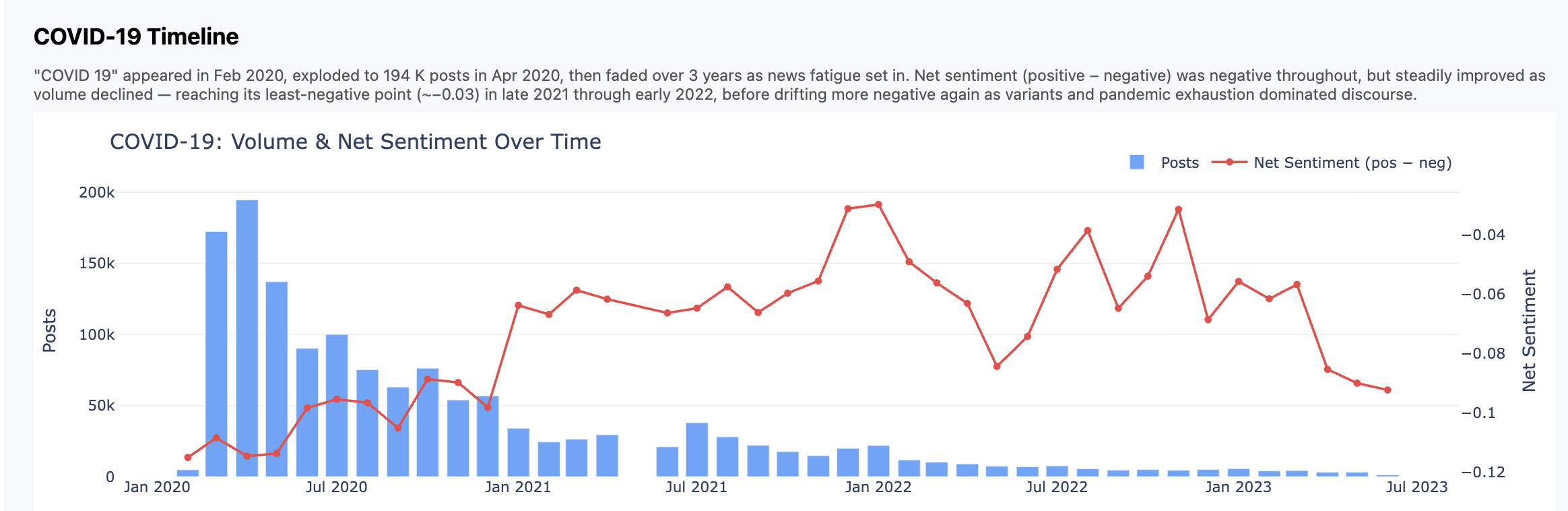
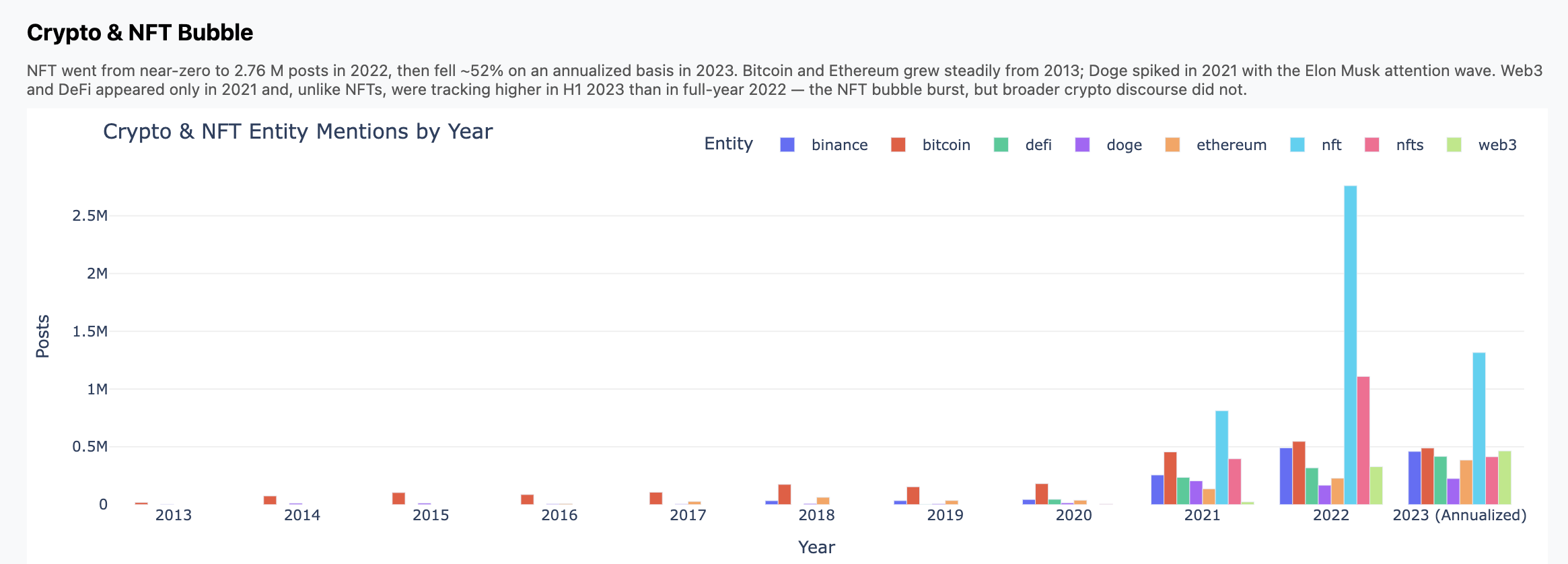
Here are three charts that fell out. Again, don't focus so much on the insights but how these came from a high-level, open ended prompt.

Chart of COVID posts and sentiment

Chart showing the Crypto bubble

Two charts showing pop culture moments

Some Screenshots

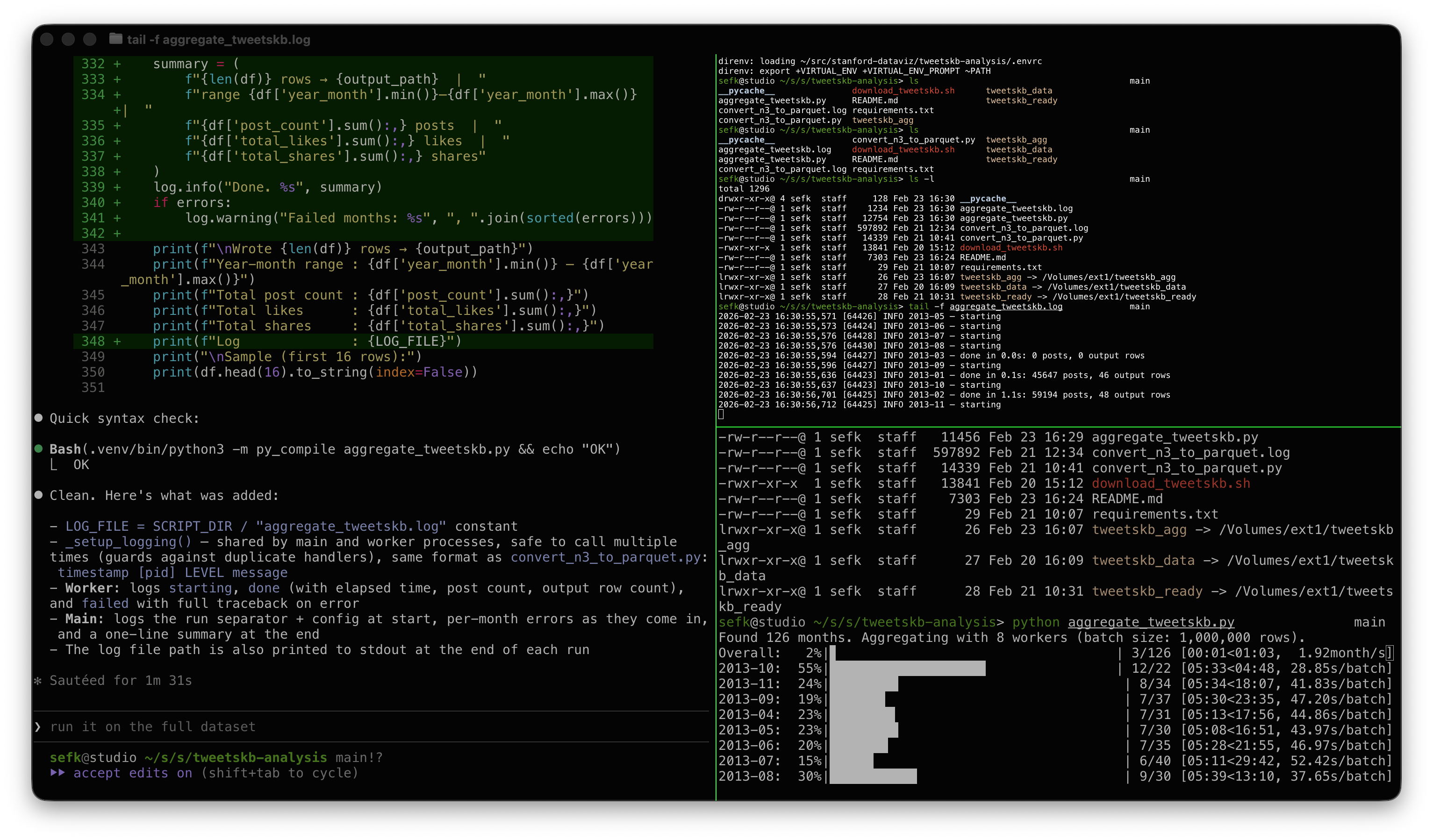
Maybe some people would like to see what this looked like when I was doing it. Here's a screenshot during pipeline development. On the left is Claude adding some logging; the top right is tail -f on a log file, and the bottom right shows the progress bars churning through the data.

Screenshot of pipeline development

My modest Mac has 8 performance cores, hence 8 workers.

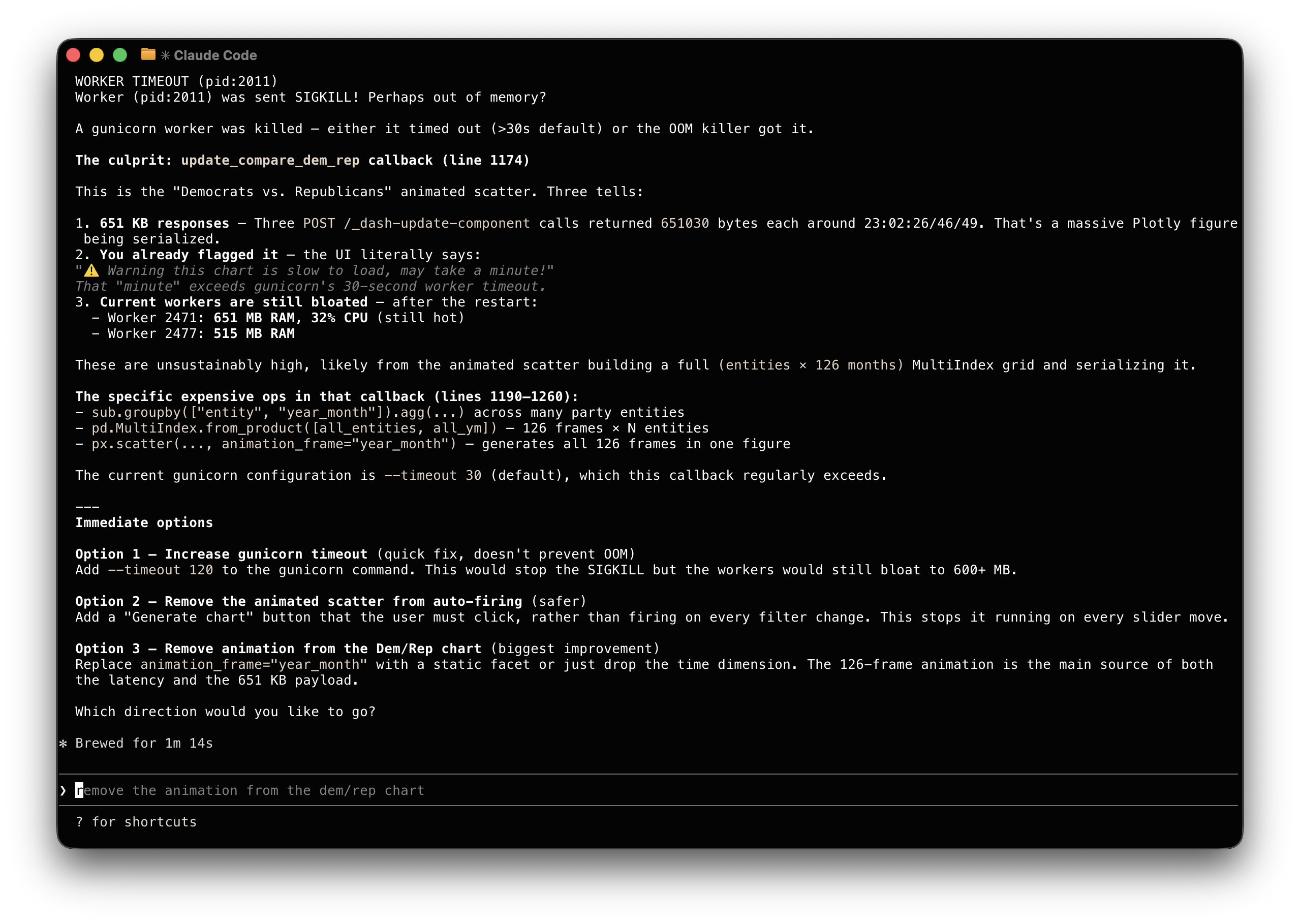
And this screenshot is kind of fun. Look at how Claude explained a worker crash issue that I asked it to debug: "You already flagged it, the UI literally says..." 😀

Screenshot of Claude debugging an ops problem

Claude made the adjustment and saved its suggestions in a Github issue in case I want to revisit it later.

AI Is Good At Janitorial Work

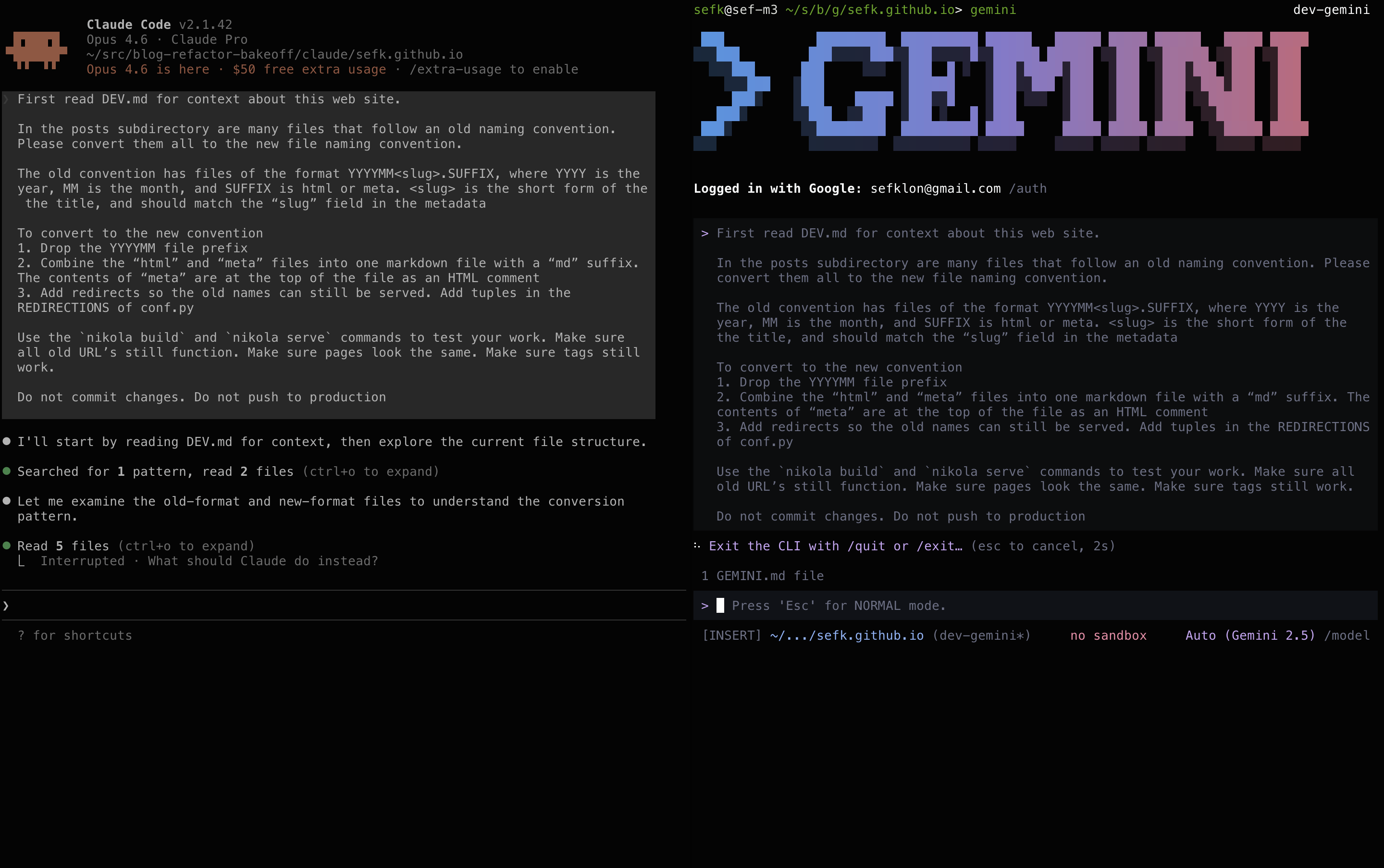
Claude Code on the left, Gemini on the right

It's been nice having AI tools at the ready for cleanup work. You know, those tasks that require a little program or script. Sure you can write it yourself, but it won't be fun, and it'll take some time, so instead you just don't bother and it doesn't get done.

Instead of just knocking this out I decided this would be a fun one to try with the two tools I'm using the most these days, Gemini and Claude. I can't really call this a proper bakeoff, since it's just those two and it's not an especially hard task.

And the result? Both did well but Gemini did a little better. Gemini got it right on the first try; Claude had two bugs that were easy to find and fix. Claude was a little nicer to work with and produced a nicer description of the solution. Aside from that, the end product was identical.

The Task

I wanted to clean up some of the old files backing this blog. I migrated the site from Wordpress to Nikola in 2013. Even back then I complained about the crufty file format, but couldn't be bothered to fix it then.

The prompt describes in a fair bit of detail what I wanted done. Probably too much detail. It's down at the bottom of this post.

The best way to see what they did is to just look at the resulting commits: Gemini and Claude. They're pretty similar. I asked both to save their work in a migration_scripts subdirectory, including its own summary of the work and full log.

For both tools I pay the $20/month that gives me access to reasonable token limits and good production models -- Gemini 3 and Sonnet 4.6.

Thoughts on Claude

I didn't describe the problem as "Wordpress-style naming" but Claude sussed that out. Honestly I'd forgotten that was the source of the problem. Nice!

I like that Claude inserted comments in the configuration file without being asked to.

Despite being told to test, there were two bugs that I had to find.

  • Some of the redirects were broken. I pointed the problem out and it did more thorough testing using curl and found the problem. The new format was what Gemini came up with in the first pass (luck? smarts?).

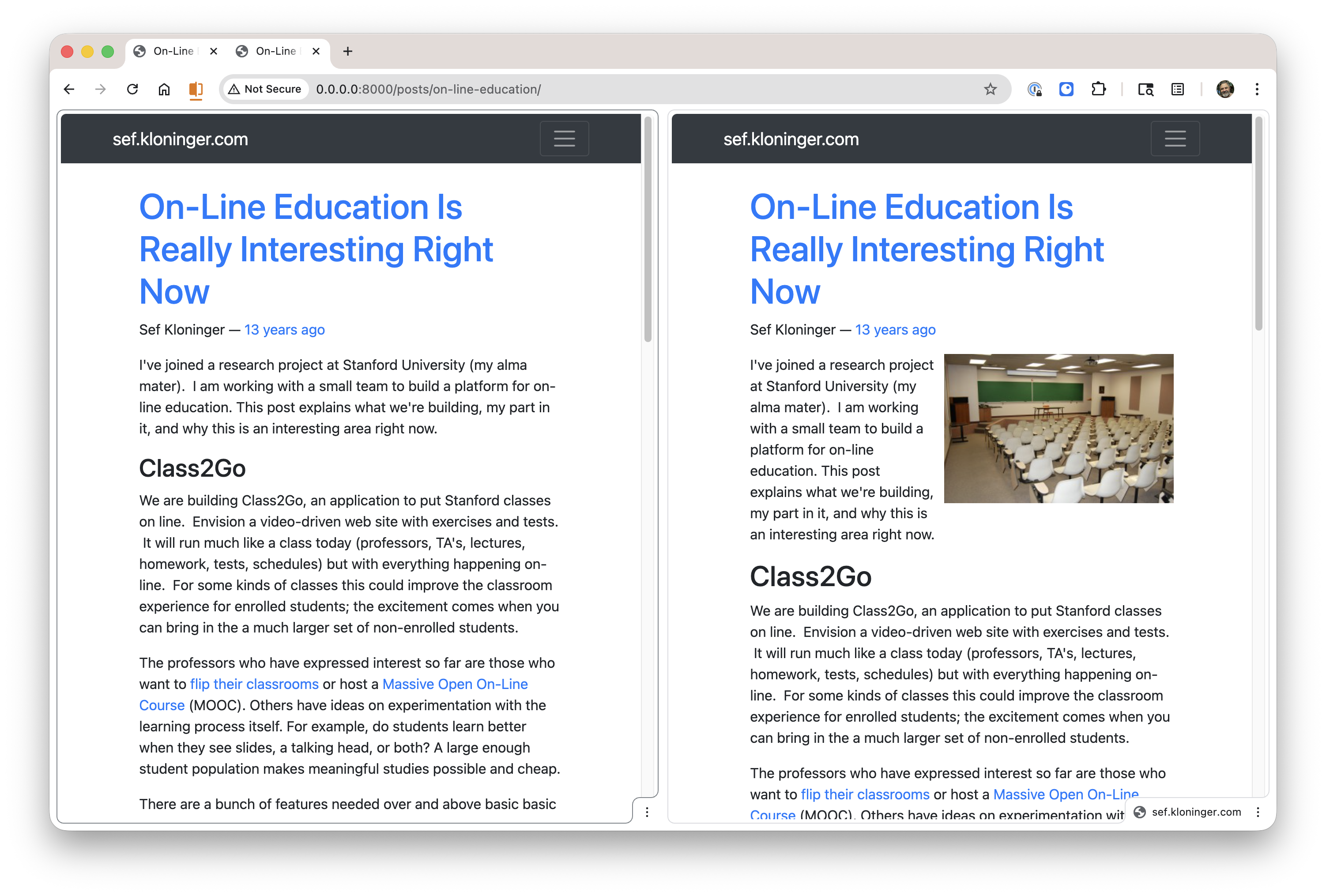
  • A missing newline between the metadata and the body caused the hero images to be dropped.

side by side view showing bug

Thoughts on Gemini

I haven't used the Gemini CLI as much by this point. It seems to have borrowed much of its UI and flow from Claude Code (slash commands, asking questions as it goes) so it's familiar. It's really nice to use, just a smidgen less mature and polished than Claude Code.

I preferred Claude's writeup a little so I went with that one. But Gemini wins the prize for nailing the task on the first try!

Usage

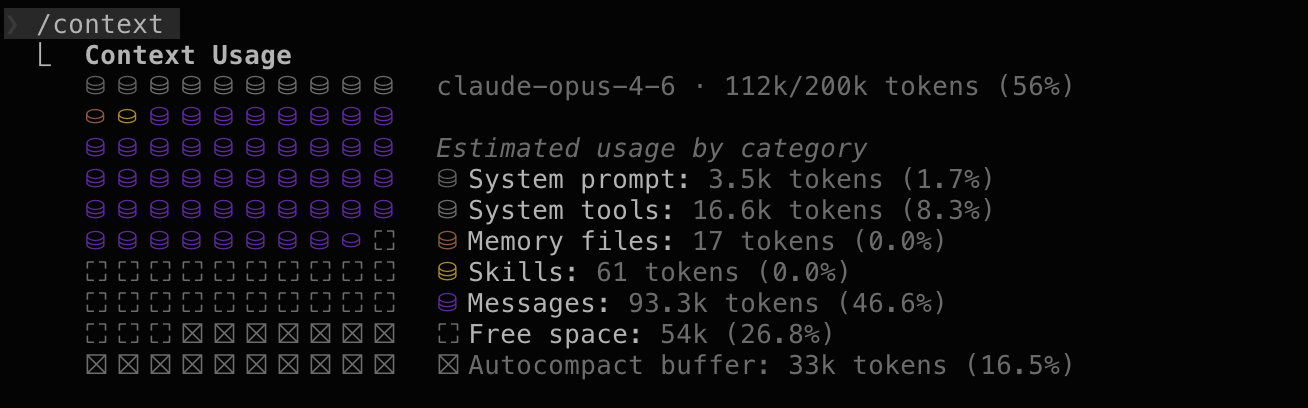
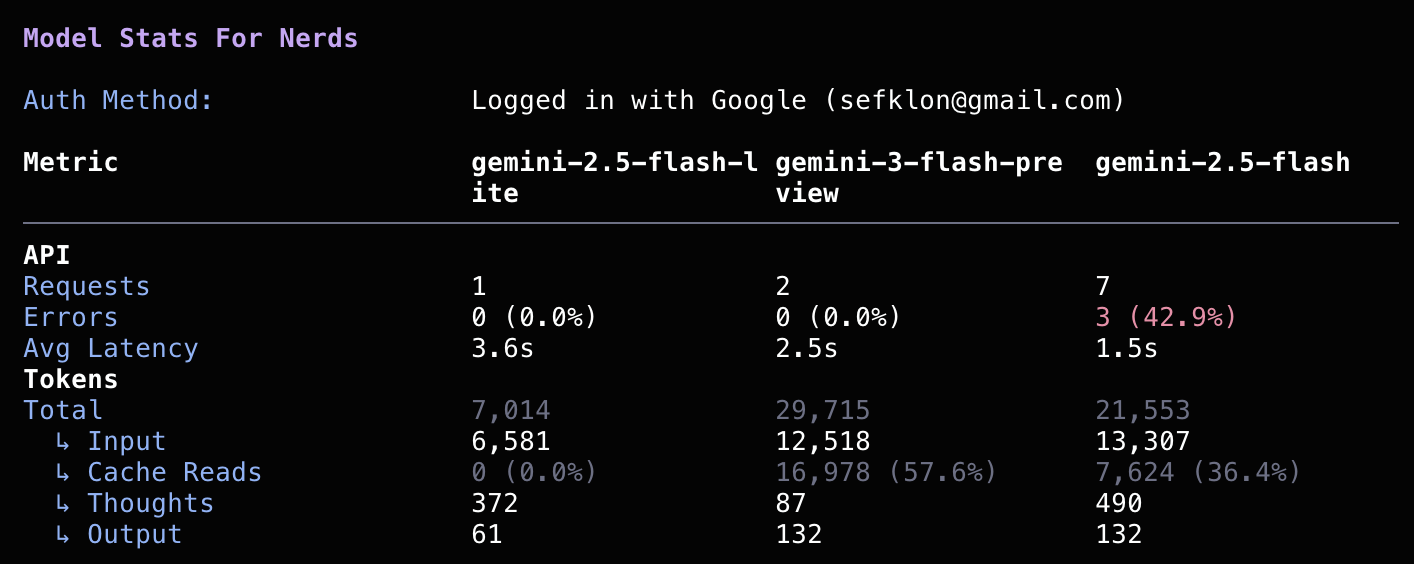
I really liked how Claude shows how much of its context window is used via the /context command. I had a harder time getting this kind of thing out of Gemini, and even when I did it was harder to grok.

I couldn't tell with either if I'm getting close to any global usage limits. I should hope not, this wasn't a very big job.

Claude /context Output

Claude context window usage

Gemini /stats model Output

Gemini "stats for nerds"

Prompt

Both started with this:

First read DEV.md for context about this web site.

In the posts subdirectory are many files that follow an old 
naming convention.  Please convert them all to the new file
naming convention.

The old convention has files of the format YYYYMM<slug>.SUFFIX,
where YYYY is the year, MM is the month, and SUFFIX is html or
meta. <slug> is the short form of the title, and should match
the "slug" field in the metadata

To convert to the new convention

1. Drop the YYYYMM file prefix

2. Combine the "html" and "meta" files into one markdown file
   with a "md" suffix. The contents of "meta" are at the top of
   the file as an HTML comment

3. Add redirects so the old names can still be served. Add tuples
   in the REDIRECTIONS of conf.py

Use the `nikola build` and `nikola serve` commands to test your
work. Make sure all old URL's still function. Make sure pages
look the same. Make sure tags still work.

Do not commit changes. Do not push to production.

I also checked in a DEV.md file that described the purpose, directory layout, and some constraints. Again, maybe overkill, but I figured this isn't the last time I'll be asking one of these tools to help me futz with this site.

Yeah, I Did Some Vibe Coding Too

This is a story about my recent experience Vibe Coding. The work itself isn't impressive and this writeup isn't different than the many gee-whiz posts you see these days. I didn't do three apps in a day. But I wanted to write up my experience, mostly to give me an excuse to tell an old-time programming story from the 1900's.

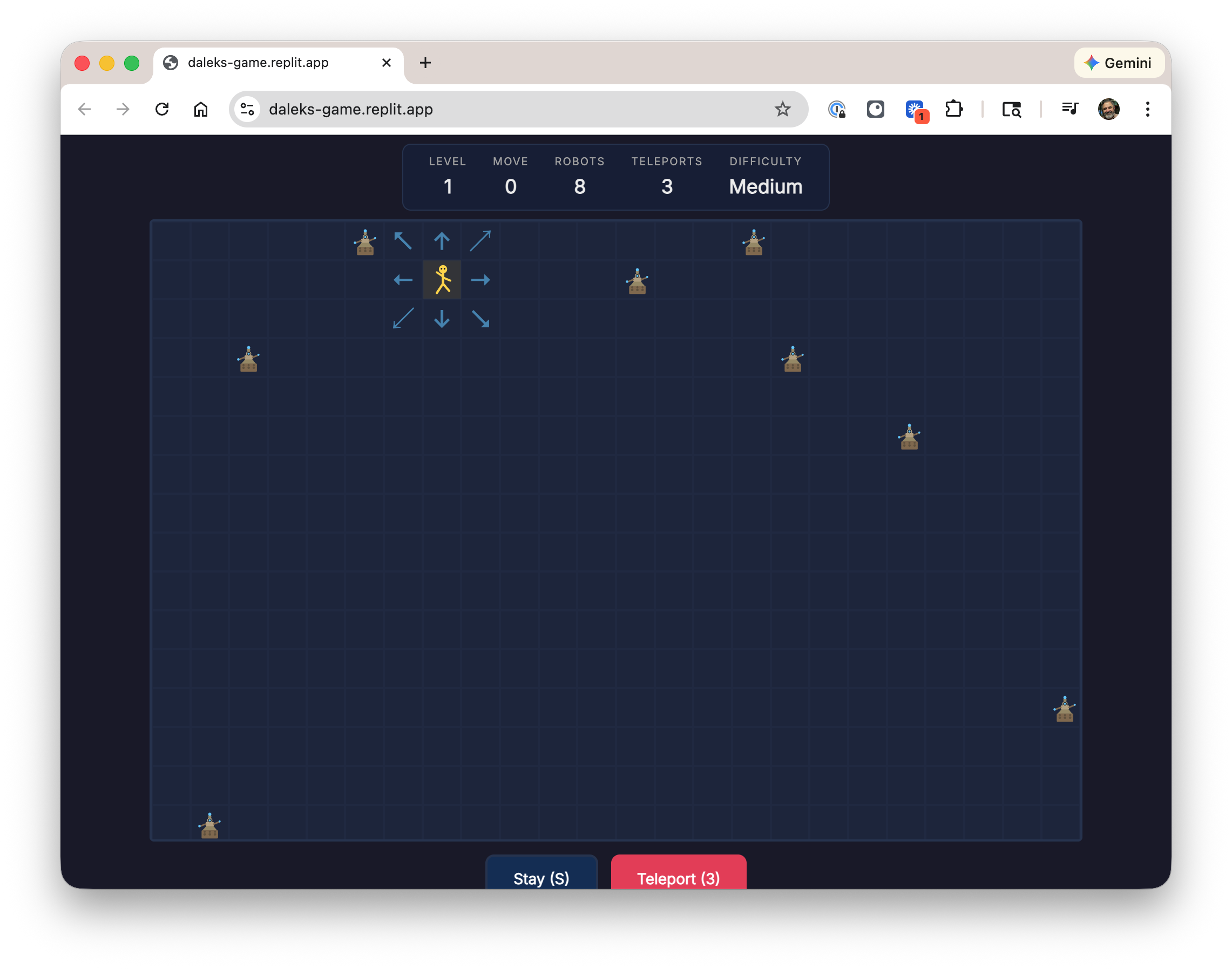
Screenshot of my recent Daleks game

Today, 2026

While I'm on a break I'm taking a Vibe Coding class. It's a fun excuse to play with some new toys, and it's well taught, and I like doing things with my friend Jane.

One interesting tidbit: the first day of class, February 3, 2026, was one year and one day after "vibe coding" itself was coined via tweet. That name seems to have stuck, for the time being at least. On last week's ATP they said that by this time next year this will probably just be called "coding" and I bet they're right.

Anyway our week one assignment was to code up a game. In about two hours and $10 I had something up and running. I spent another couple of hours futzing with version control, documentation, and hosting. But that's it!

It's pretty basic, and not all that much fun, but you can play it here. It's hosted on Github pages, just like this blog. The code and construction notes are in checked in.

This was my first experience with Replit. It's impressive and fun. This was what was recommended for the class and the good folks at Replit were nice enough to give us all $30 in credits, which I had plenty to spare. Most of my comrades presented apps that were fancier than mine with 3D graphics, sound, and more interactive gameplay. Some also said, though, that they ended up spending much more than I did, so YMMV on costs.

One interesting part was dealing with integration. To get their code deployed onto my personal website required wiring up a GitHub workflow, which I'd never done before. No problem, Replit took care of that too. Then I asked Gemini to get local hosting running. When I hit a permissions problem and a crash I had to resist the urge to copy paste the error messages into a search boxes and Stack Overflow, like I've done for years. Instead I asked Gemini to debug and sort this out for itself and it did straight away. Pretty great.

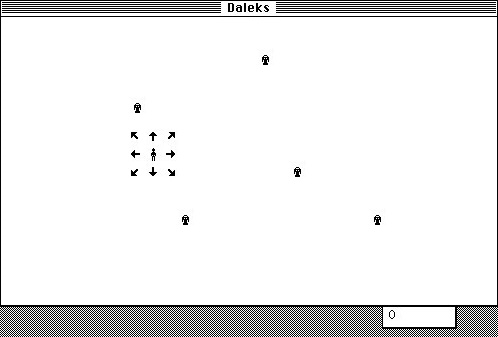
Original Daleks game from 1984

Forty Years Ago, 1985

Why'd I pick this weird old chase game? Well, that's the more fun and nostalgic part of the story.

When I was fourteen years old, I spent the summer hand-coding a video game. I'd gone to a family gathering and my older cousin Erik brought his Mac from college. It was the first I'd seen a Mac and fell in love. I thought the Daleks game he had running on it was so cool. The screenshot on the right is from that Classic Mac website of that game that I found online, and is exactly how I remember it looked.

Upon return to Fresno I got to work. I spent most of the rest of that summer writing a clone of Daleks on my Apple //e. All hand-coded 6502 opcodes and twos complement math for branch offsets by hand (I didn't have an assembler), in pencil on graph paper. The hardest part was getting smooth animation working, since the Apple //e "hi res" graphics system was super quirky.

It took about two months to get it working. It's the first time I can remember being in a flow state and I loved it. It was my first "real program" and began my lifelong love of computers.

Thanks, Daisy Disk

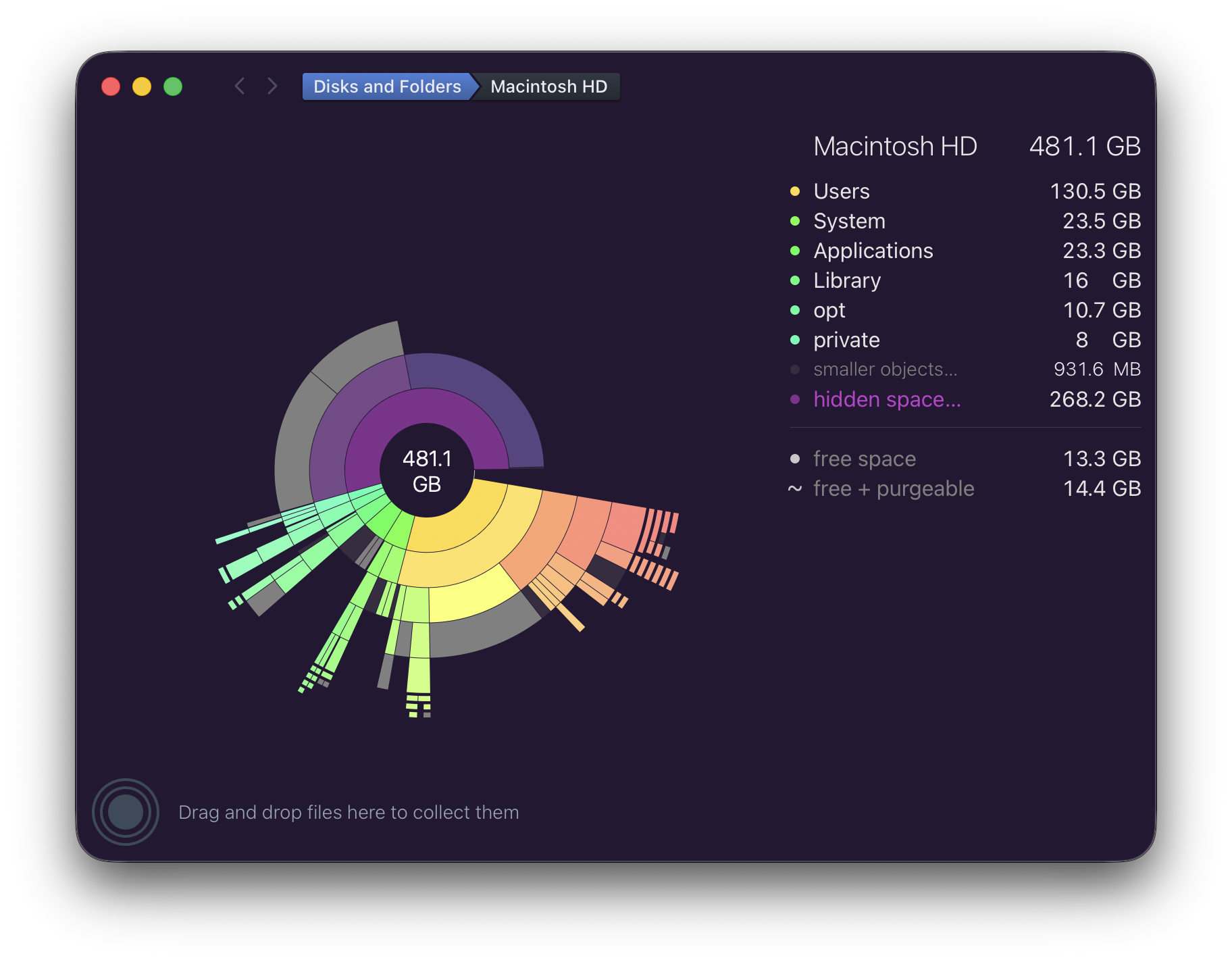
Screenshot of Daisy Disk with a disk nearly full

Recently I've been beguiled by my local disk being almost full. This is on my everyday M3 MacBook Air running the latest Tahoe 26.2.

For years I've used Daisy Disk to debug space issues like this, it's great. In this case it showed the problem, but wasn't able to narrow down what the problem was nor remove it.

With no success through the normal means ("Googling around"), I wrote the developer of Daisy Disk, Oleg. They explained the problem and suggested a workaround. It worked like a champ! I included the explanation below and screenshots showing before and after.

I want to say thanks to Oleg for their help. And this is a nice opportunity to say thank you to indie developers in general who are often so helpful sharing their expertise. What a wonderful and important part of our community.


Oleg's explanation:

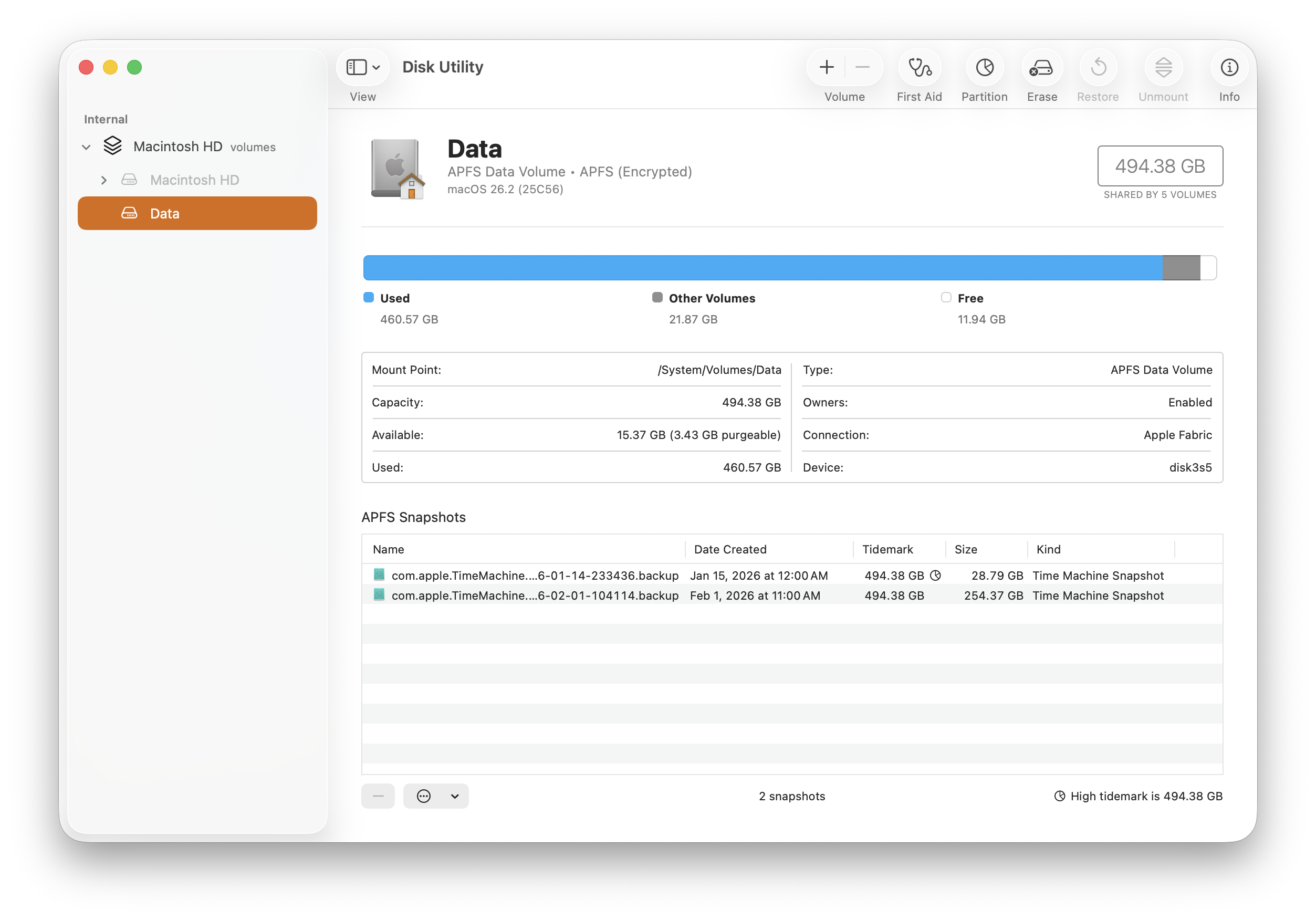
    This error has recently been reported by a few other users as well, and our investigation shows that it's caused by a new bug in macOS, introduced in one of its recent updates. (It didn't happen before). The symptom is exactly like in your case - a Time Machine snapshot becomes damaged for unknown reason, and it cannot be deleted in the normal way - not only in DaisyDisk, but also not in Terminal, using the tmutil command-line tool. Moreover, the tmutil tool doesn't even list the damaged snapshot. It becomes almost entirely lost, while it still consumes disk space.

    We have found the following workaround solution. Please launch the system's Disk Utility (/Applications/Utilities/Disk Utility.app) and in the left sidebar, select your data volume, likely called "Macintosh HD - Data". Note that there will also be another volume called "Macintosh HD" (without "Data"), but you should select specifically "Macintosh HD - Data". Then select the View \> Show APFS Snapshots menu command. In the lower part of the window, you will see the damaged Time Machine snapshot in the list. Please select it and then click the "-" (minus) button at the bottom to delete it.

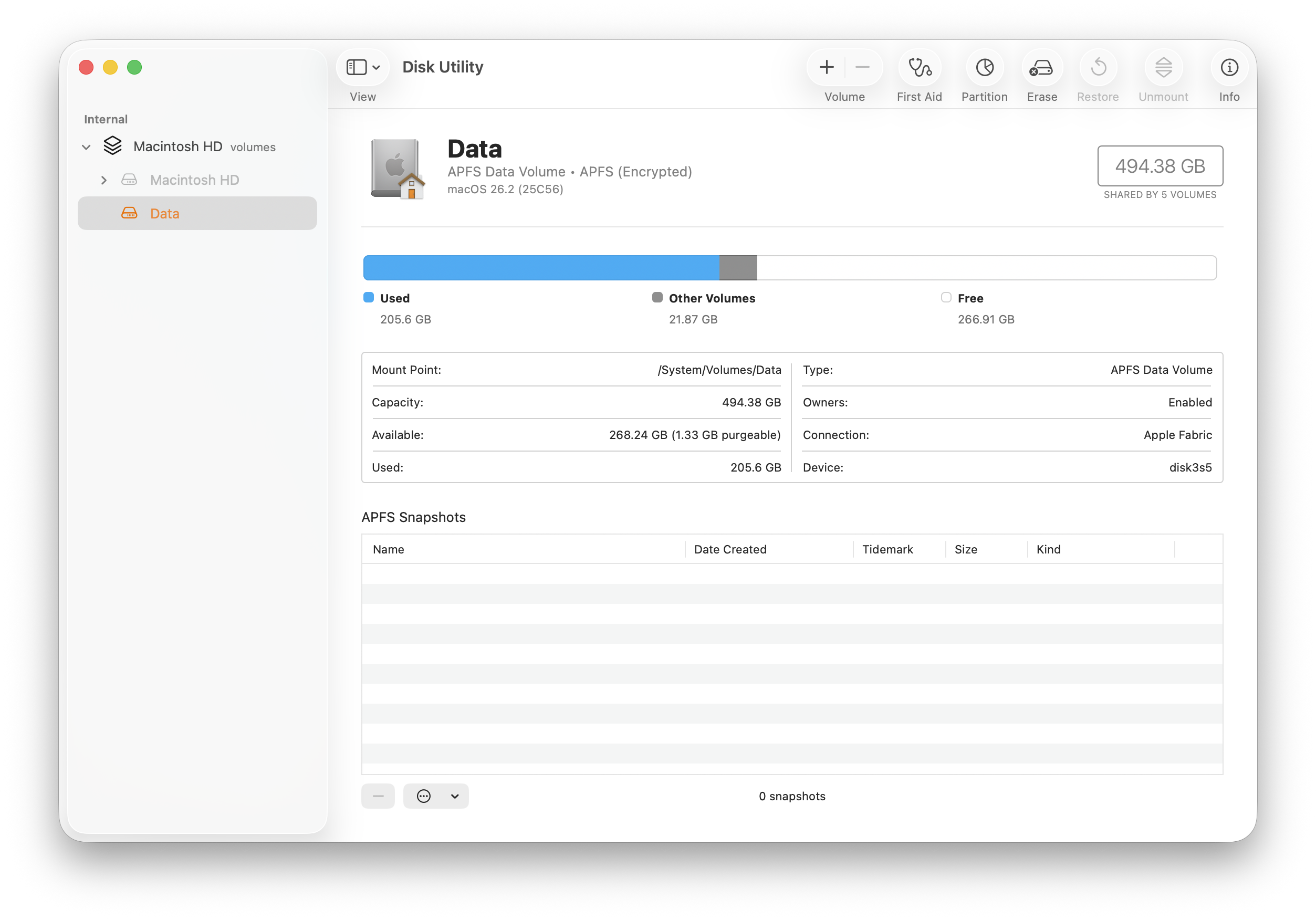
And screenshots showing the before and after. Note the two broken snapshots in the list below.

Disk utility showing disk almost full

After

Disk utility showing disk back to normal


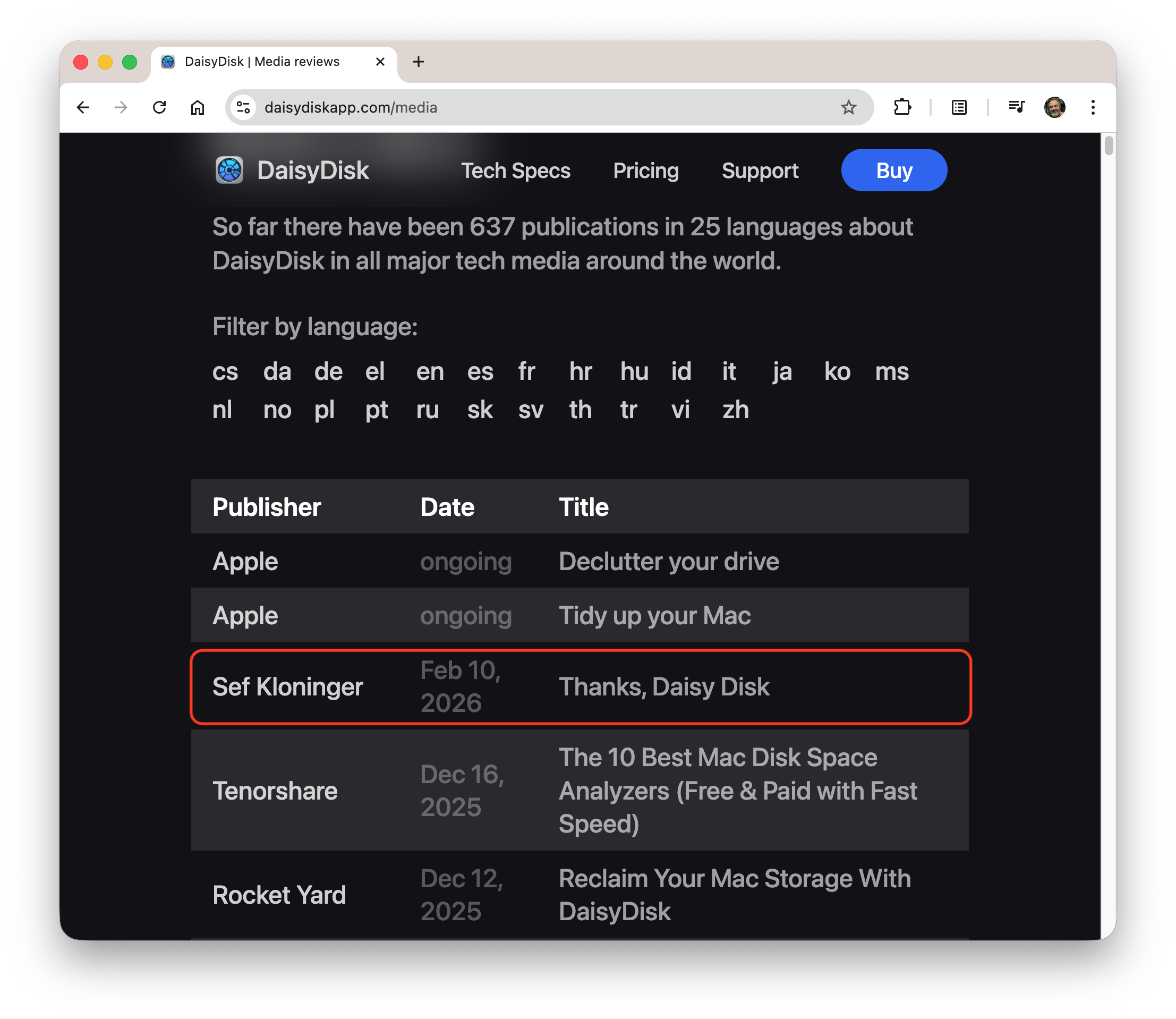
Postscript: Oleg put me on the Daisy Disk media page, neat!